
Calibration and It's Errors
How to calibrate?
The Aranet4 can be calibrated either automatically or manually at home. The general recommendation is to redo the calibration for Aranet4 sensors once per year, as the sensor measurement values will start to drift over time.
Out-of-the-box brand new sensors have the factory calibration and for some time there is no need to do it and measurements will be precise just by putting the batteries and pairing sensors to the Aranet PRO base station.
In the case of automatic calibration mode, the Aranet4 device needs to be exposed to fresh air at around 420 ppm (for instance, outdoors or in a room with good air exchange) for approximately 8 hours during each 30 day operation period.
When doing a manual calibration the Aranet4 device must be exposed to fresh air (about 420 ppm of CO₂) and the environment should be stable (not changing) for 30 minutes while the calibration is done. Maintain a distance of at least 1 meter from the device during the calibration process so the CO₂ from your breath wouldn’t impede the calibration. To initiate the manual CO₂ calibration change the switch position at the back of the device behind the batteries from MANUAL to AUTO and back to MANUAL (maintain a maximum of 1 second between each movement):
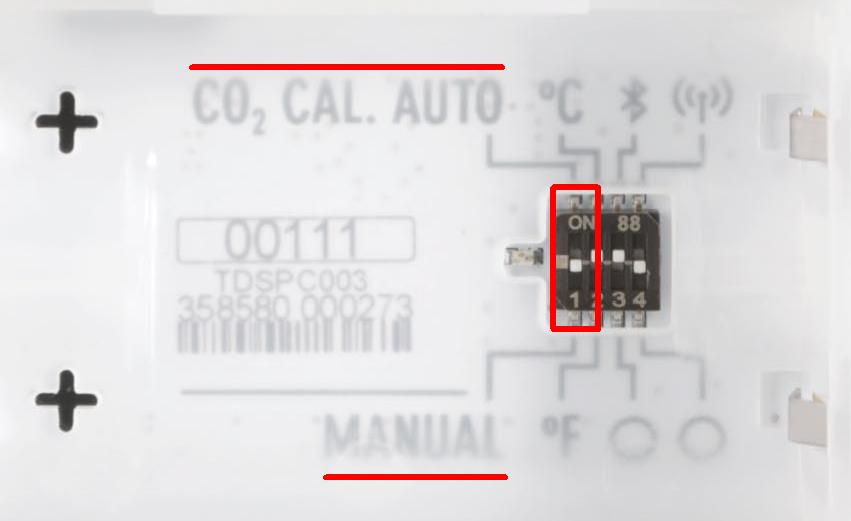
Please note! The batteries must be inserted into the device. To trigger the switch, use SIM-tool delivered with Aranet4 or another similar tool.
The calibration progress will be displayed on the screen of the device. In case of a calibration failure message, make sure that the environmental requirements are met and repeat the process from the beginning.
Manual calibration can be done using the Aranet4 app as well. You can see the instructions on how to do the manual calibration via the app (pārfilmēt video).
For reference background CO₂ level please check the global outdoor CO₂ level map: https://earth.nullschool.net/#current/chem/surface/level/overlay=co2sc/orthographic=29.16,51.27,791/loc=24.215,57.021 Click with the mouse pointer to your location on the map, and you will see current CO₂ level outdoors.
Calibration error
CALIBRATION FAILED ! Unexpected error
Remove the batteries for 15 minutes and try the calibration again. If the calibration is still not possible and an error is still shown on the screen of the device, then please proceed with the RMA process: https://rma.aranet.com/
Calibration failed, unstable environment

The error message "Calibration failed, unstable environment" - means that during the calibration process of the Aranet4 device, the CO₂ concentration level changes in the surrounding air were too large for the device to correctly set the 420 ppm calibration baseline.
To recover the operation of the device and obtain a successful and correct calibration result, please try:
Take out the batteries of the Aranet4 device;
Put batteries in the correct polarization again inside the device (both batteries in the same direction with + pole on the left side);
Restart the phone where the Aranet4 application is installed;
Try the calibration again as shown in the video, except it is better to put the sensor, if possible, in an outdoor environment during the calibration process for 15 minutes without any person nearby;
If the calibration is still not possible and an error is still shown on the screen of the device, then please proceed with the RMA process: https://rma.aranet.com/
Other error messages
There are three kinds of error messages that can appear on the screen of the device:
0x8106, 0x800E – 0xFFFE
CO₂ sensor malfunction or CO₂ measurement is out of range, caused by:
- Excessive CO₂ concentration near the device
- Excessive moisture near the device
-Incorrect calibration of CO₂ sensor
- Damaged CO₂ sensor
1. Let the Aranet4 device dry completely
2. Manually recalibrate the CO₂ sensor
3. If the problem persists, fill out the RMA form
0ppm or 9999ppm
The CO₂ sensor is misadjusted or damaged
1. Manually recalibrate the CO₂ sensor
2. If the problem persists, fill out the RMA form
Last updated