
Coloured thresholds
Starting from Aranet Home app version v2.0.4 it is possible to change colour indication threshold levels for the measurements. In the example below, it is done for CO₂ measurements.
From the Aranet Home application, it is possible to change the value for both yellow and red threshold levels of the Aranet4 device in the range of 300 to 2000 ppm.
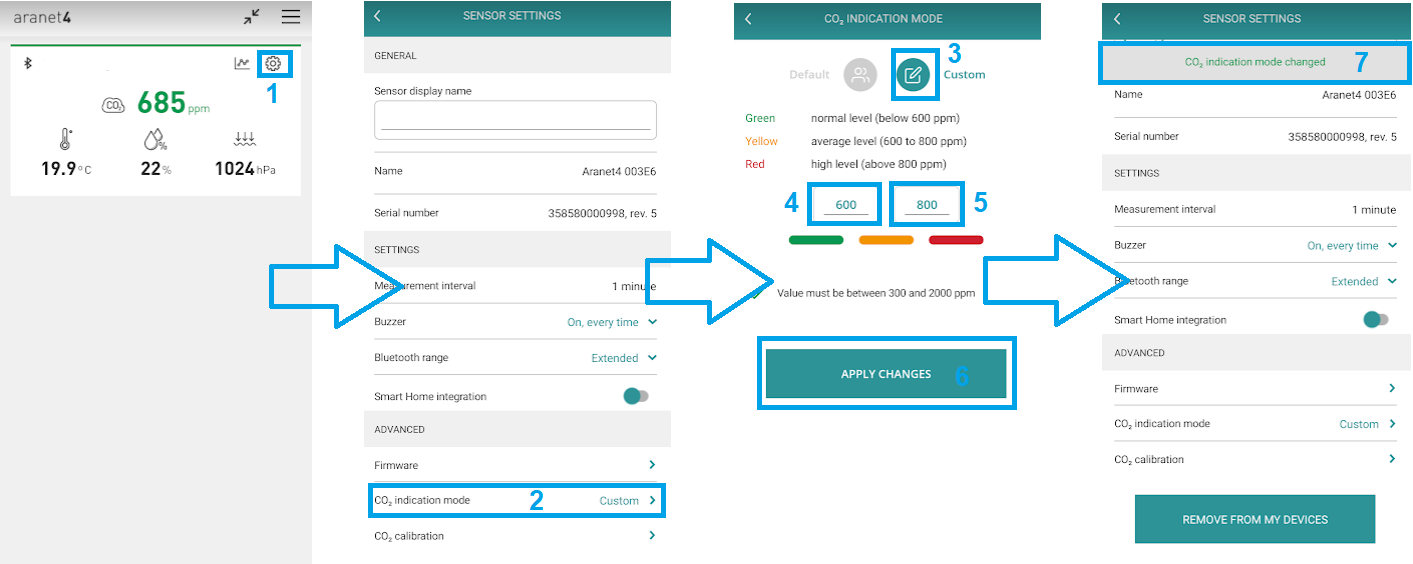
To configure these levels in the Aranet4 application, please:
Click on the settings “wheel” icon in the record of the necessary Aranet4 device;
In the newly opened page, click on the section CO₂ indication mode.
Select Custom indication mode.
Set the Yellow threshold value as necessary.
Set the Red threshold value as necessary.
Save settings by pressing on APPLY CHANGES button.
In case new threshold levels were successfully configured, then the Aranet4 application will show a success message: CO₂ indication mode changed.
The colour indication threshold level changing was not possible with application versions up to v1.20. By default, the CO₂ measurement colour indication threshold levels were as follows: Green – below 1000 ppm Yellow – 1000 - 1400 ppm Red – above 1400 ppm For Temperature:
Too High (red) — >26°C (78.8°F) Normal (green) — 20°C — 26°C (68.0 - 78.8°F) Too low (blue) — <20°C (68.0°F)
For RH:
Too High (red) — 70% RH Normal (green) — 30% RH — 70% RH Too low (blue) — 30% RH
For Radiation:
Green – below 0.20 μSv/h Yellow – 0.20 μSv/h — 10.0 μSv/h Red – above 10.0 μSv/h
For Radon:
Green – below 100 Bq/m3 Yellow – 100 Bq/m3 — 300 Bq/m3 Red – above 300 Bq/m3
Last updated